Non-Anime VTuber Models: How to Choose Your Avatar Style
Compare four non-anime VTuber styles—cartoon, furry, robot, and mascot—choose a 2D or 3D format, and test how expressions read in a small OBS overlay.
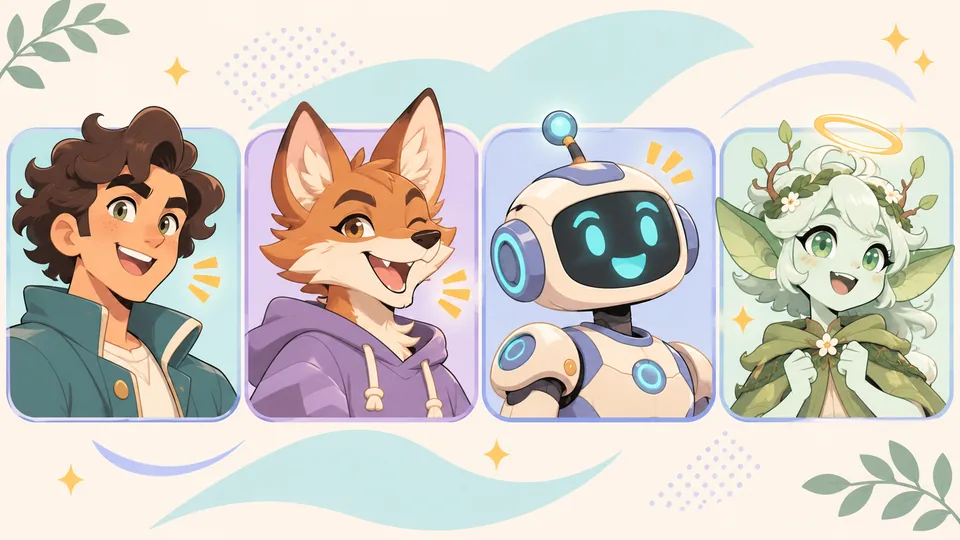
A fox, a retro robot, and a cartoon human can all work as VTuber avatars. Put each one in the corner of a busy gameplay scene and the differences become obvious. A fox's ears are easy to spot, but a long muzzle can hide its mouth as it turns. A robot with two bright eyes and a simple visor can stay expressive at the same size.
If you're choosing a non-anime VTuber model, start with the framing and expressions your stream needs. Then pick a look you enjoy performing and a model format that can deliver it without fighting your anatomy.
Four non-anime VTuber styles and their rigging trade-offs
Non-anime avatars often trade standard human facial proportions for stronger silhouettes—snouts, visors, oversized brows, or floating limbs. Those shapes change both how viewers read your reactions at overlay size and how an artist or tool rigs the model.
| Avatar style | Where it fits | What to test in a small frame | 2D & 3D rigging trade-offs |
|---|---|---|---|
| Western cartoon human | Commentary, tutorials, and streams where facial reactions carry the conversation | Can you tell a raised brow from a blink? Bold brows and a clear mouth silhouette help. | Graphic line art and asymmetric mouths fit PNGTuber states and Live2D deformers well; 3D models need clean topology around the mouth and brows to avoid stiff creases. |
| Anthropomorphic animal (furry) | Cozy streams, roleplay, or any character with a strong animal silhouette | Do the ears fit inside the crop? Can you still see the jaw move when the head turns? | Long muzzles are hard to rotate past a three-quarter angle in 2D Live2D without flattening; 3D VRM handles head turns naturally, provided the jaw bone and inner mouth are rigged cleanly. |
| Humanoid robot / object head | Tech streams, sci-fi games, and deadpan comedy | Are the visor's idle, talking, and blinking states distinct without relying on subtle changes in glow? | Flat screens and visors do not need complex skin deformation; texture swaps or stepped layer toggles often read cleaner than smooth blendshape interpolation. |
| Fantasy or creature mascot | Tabletop campaigns, lore-heavy channels, and character-led streams | Do horns, wings, or floating props crowd the face or get cut off by the overlay bounds? | Bipedal creatures can use a standard humanoid 3D skeleton; quadrupeds, slimes, or floating mascots cannot map cleanly to VRM humanoid bones and are usually easier to build as PNGTubers or Live2D rigs. |
A cartoon host can signal surprise with one raised eyebrow. Give that same reaction to a robot and it might widen two eye shapes or flash a new visor pattern. Decide how your character looks while listening, talking, and reacting. Those three states will tell you more than a detailed splash illustration.
If you're leaning toward an animal, switch between neutral and open-mouth poses in the Furry Wolf showcase and watch what changes around the muzzle. For help developing the silhouette, outfit, and palette, see our VTuber character design guide.
Choose a model format and an input
Your visual style, model format, and controls are separate decisions. A retro robot could be two PNG states switched by microphone volume, a Live2D model with camera-driven visor changes, or a 3D VRM that turns its head as you move.
- PNGTuber: Start with separate idle and talking images. A microphone threshold switches between them, and most reactive-image apps let you assign extra expressions to hotkeys. It is the fastest way to test non-humanoid shapes, pixel art, or extreme cartoon squash-and-stretch that would break a continuous rig.
- 2D Live2D: An artist splits the illustration into layers, and a rigger uses meshes and parameters to animate them. Decide which features need to move before the art is separated. A fox might need independent jaw, ear, and muzzle depth layers; a TV-head robot might need discrete screen icons on separate layers.
- 3D VRM: A 3D avatar uses a humanoid skeleton for pose and movement, with facial expressions configured via blendshapes or texture states. Because the geometry exists in 3D space, snouts, helmets, and horns keep their perspective when you turn your head. Confirm the VRM version (
0.xvs.1.0) and expression bindings your tracking app supports.
Make a short list of the movements you need. If all you need is a readable talking state, two PNGs can carry the performance. If your character needs to follow your head turns, blink with you, or react mid-sentence, test those controls in the app you plan to use. Our PNGTuber vs. 2D vs. 3D comparison goes deeper into each setup.
Build a reference sheet around the face and anatomy
Standard anime turnarounds assume a flat facial plane and human proportions. When briefing an artist or preparing assets for a non-anime design, document how your specific anatomy moves.
Sketch a front view, a side or three-quarter view, and a close-up of the face. Add flat color swatches and show the character at rest, blinking, smiling, and talking. Keep the crop and head angle consistent across the expression examples so a rigger can see exactly what changes.
- For an animal or snouted creature: Draw a side view of the head with the mouth closed and open. Clarify whether the lower jaw rotates like a hinge or whether the upper muzzle and lips also flex when speaking.
- For a robot, masked character, or object head: Show what a blink and vowel shapes look like on the visor or faceplate. If the head is a rigid helmet or monitor, note that it should move as one solid piece with the neck rather than squashing during head tilts.
- For a fantasy mascot: Mark any parts that need room to move, such as wings, oversized ears, or a floating halo, and note which pieces can be simplified if they clip into the shoulders.
Write down which movements should follow the camera and which should be triggered manually by hotkeys. Use the VTuber reference sheet guide to turn those notes into a production brief.
Test the avatar at stream size in OBS
- Use your real scene. Put the concept art in the corner where the finished model will appear. Size it as you would on stream and check it against both bright and dark game footage. Compare the idle and talking drawings at that exact scale.
- Repeat with the working model. Record a short clip while speaking, blinking, and turning as far as you usually do. Watch for clipped ears or horns, muddy mouth shapes on dark fur, and shoulder armor or collars that cover the chin. For a microphone-driven PNGTuber, check whether the talking state fires during quiet speech and returns to idle cleanly during pauses.
- Watch the recording at viewer size. Shrink playback to roughly the size someone might watch on a phone. If a reaction is hard to read, try a tighter bust-up crop, stronger contrast between the inside of the mouth and the face, or a larger step between expression states. If you plan to keep your face off stream, check every scene in the recording for accidental camera sources. See our guide to streaming without showing your face for the full privacy setup.
In the demo below, watch the avatar in the OBS preview canvas as it moves. Use the same view to check how much room your own avatar needs to turn without clipping against the source boundary.
Try a humanoid concept in Virmii
Virmii generates rigged 3D VRM avatars from a single character image (From image) or a written prompt (From text). Because the pipeline builds and binds a standard humanoid 3D skeleton, how well a non-anime design translates depends on its body structure and face readability:
| Design type | Fit with Virmii's 3D pipeline | What to expect and check |
|---|---|---|
| Stylized cartoon humans & fantasy humanoids | Strong fit | Bipedal proportions with a clear torso, arms, legs, and neck rig cleanly; keep hands and limbs separated in your input image. |
| Bipedal anthropomorphic animals (furries) | Good fit for 3D body & head turns | Muzzles, upright ears, and tails generate as 3D geometry (like the Furry Wolf showcase); check side-profile jaw shape and tail placement. |
| Humanoid robots & masked characters | Good fit for body rig; check facial workflow | The humanoid body rigs normally, but faceless helmets or non-standard visor graphics may not suit automatic eye and mouth placement. |
| Non-humanoid mascots (quadrupeds, floating orbs, slimes) | Not a fit for standard VRM rigging | Automatic humanoid bone mapping expects two arms, two legs, and a head; use PNGTuber states, Live2D, or custom 3D rigging instead. |
If your concept fits a humanoid 3D rig, export one clean, uncropped character view—without turnaround panels, text labels, or color swatches—and open Virmii's image-to-avatar workflow to create and preview a 3D model.
On a completed Virmii-generated model, you can also generate optional AI expression artwork (13 poses for blinking, smiling, and vowel mouth shapes) and test camera-driven tracking in Live Studio or on a private transparent stage in OBS. When framing the face reference for expression generation, give the camera a clear front view where both eyes and the mouth are visible inside the guide square; heavy helmets, obscured faces, or extreme snout angles can make automatic expression placement harder.
The generated expression artwork plays inside Virmii previews, Live Studio, and the OBS stage, and stays separate from the downloaded VRM file. If you plan to stream in another app, test the exported VRM and its own expression bindings there. See our AI expression generation guide for details.
Frequently asked questions
Can I use a non-anime avatar in VTube Studio or VSeeFace?
Yes. Tracking software cares about the file format and parameter bindings, not the art style. VTube Studio supports 2D Live2D models, and VSeeFace supports 3D VRM 0.x avatars. Check which format your preferred app accepts and confirm that the model includes the eye, brow, and mouth controls your performance relies on.
How does face tracking work on a muzzle or a robot visor?
Your webcam or phone measures your human facial movements—such as eye closure, brow height, and mouth openness—and outputs normalized values. The avatar's rig decides what those numbers trigger. An open-mouth signal (aa) can rotate a wolf's hinged jaw bone in 3D, deform a cartoon mouth in Live2D, or switch a robot's visor to a glowing speaking graphic. Record a short test at your overlay size to verify that viewers can tell when the character starts and stops speaking.
Which format is easiest for a non-humanoid or floating mascot?
Start with a PNGTuber or a 2D Live2D model. The 3D VRM standard requires a humanoid bone hierarchy—hips, spine, chest, neck, head, and four limbs—so a floating orb, a four-legged pet, or an inanimate object cannot use standard VRM auto-rigging or motion retargeting without workarounds. A microphone-driven PNGTuber lets you animate any silhouette immediately with two to four drawings.
Do I need special tracking hardware for a non-anime VTuber model?
No. A standard webcam or microphone is enough for most setups. Expressive non-anime models rely on well-designed states—such as high-contrast mouth interiors, distinct visor icons, or lively ear physics—rather than expensive motion-capture gear. Tune your microphone threshold or camera sensitivity in your tracking app before buying extra hardware.