Tutorials
Virmii vs a 2D Avatar Solution: A Hands-On Avatar and OBS Test
Follow a cat-girl reference through a 2D avatar solution and Virmii: generated portraits, a 3D VRM model, expressions, OBS recordings, and pricing.
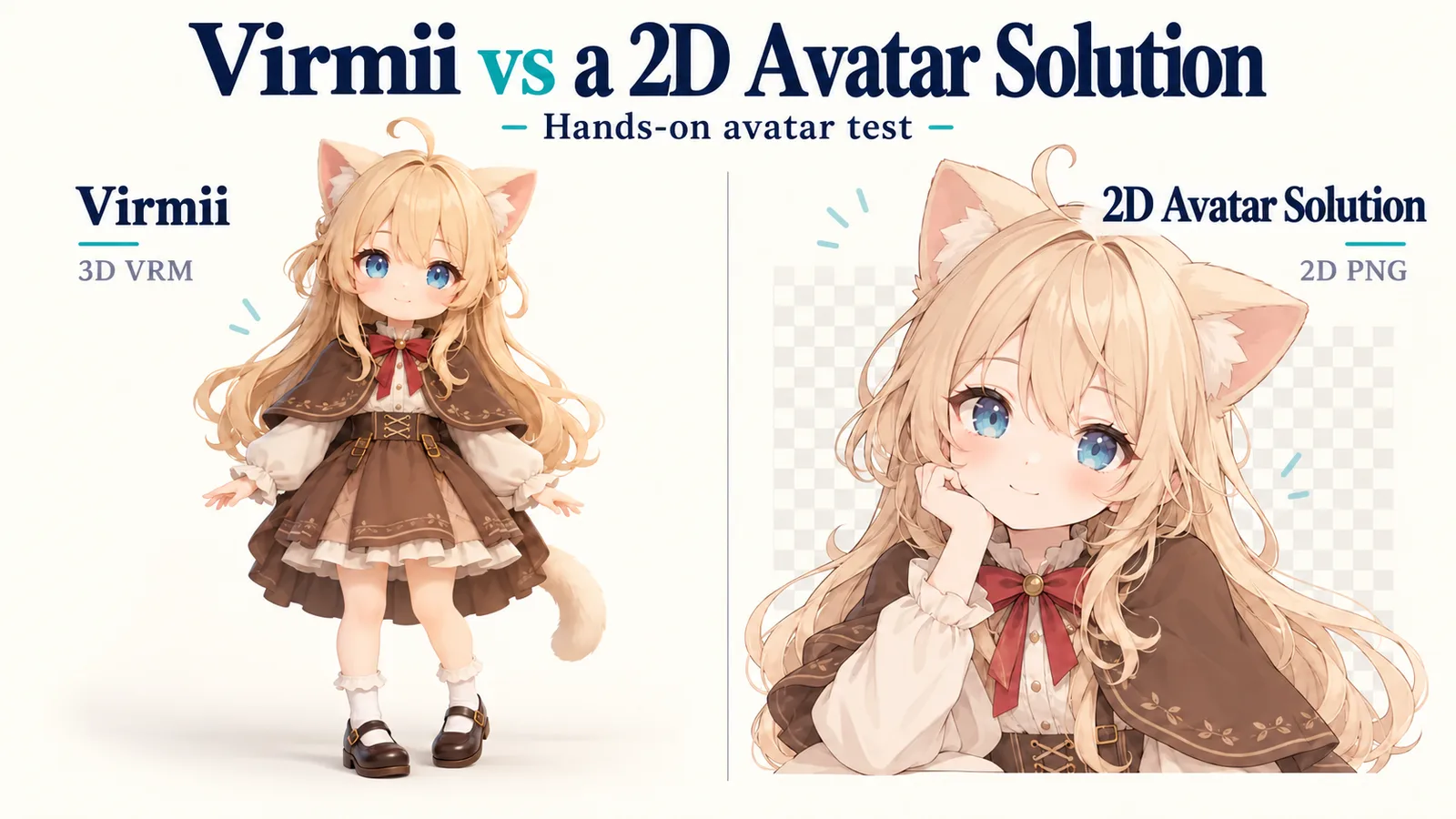
I wanted to see what happened to the same cat-girl design in two different avatar tools. In a 2D avatar solution, I asked for a portrait and generated the expressions needed for a reactive PNG avatar. In Virmii, I used a full-body reference to build a 3D model. Both ended up on the OBS canvas.
I build Virmii, so this is my own product comparison. The screenshots show where the character stayed close to the reference and where the artwork changed.
I ran these tests on October 20, 2026. The recordings are short: enough to show the avatars in OBS, but not to compare tracking delay or reliability over a long stream. The other service is anonymized as a 2D avatar solution. Its branding, account details, and private output URLs are concealed in the screenshots. The cover is an illustration created for this article.
Creating an avatar in the 2D avatar solution
The reference character had long pale hair, blue eyes, a brown cape, and a red ribbon. I wanted those details to survive the change to a PNGTuber portrait.
The reference image and prompt
I uploaded the image under Person Reference and selected Anime. Chibi, Cartoon, Pixel Art, and None were also available. The upload limit was 2 MB for PNG, JPG, or WebP files.
My prompt described a chibi character even though I chose Anime in the style selector. It also asked for an upper-body portrait. That framing was my choice; the reference showed the whole character.
The page counted this prompt as 522 of the available 1,000 characters:
A cute chibi cat girl based on the uploaded reference image, with fluffy cream-colored cat ears, long soft ash-blonde hair, large expressive blue eyes, and a gentle smile. She wears an oversized warm brown cape over a cream-colored outfit, with a red ribbon at her neck. Preserve the reference character’s hairstyle, outfit, and color palette. Front-facing, centered upper-body portrait, with her face clearly visible, clean line art, soft pastel shading, and a transparent background. A cozy and charming PNGTuber avatar.
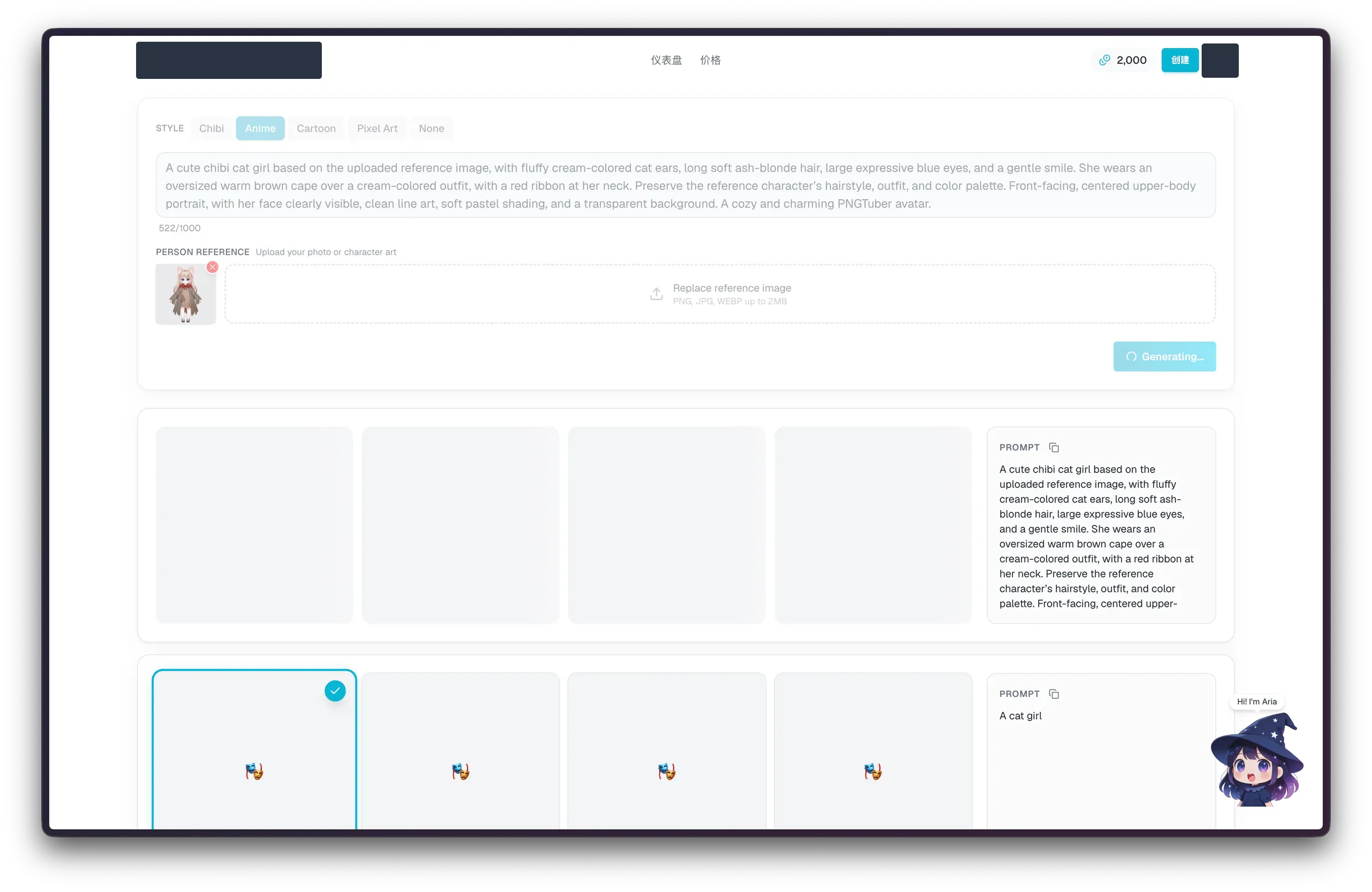
Four empty preview cards appeared while generation was running.
Choosing one of the four portraits
The four results were close variations. All kept the cat ears, pale hair, blue eyes, brown cape, and red ribbon. The first three had similar close framing. The fourth showed more of the shoulders and cape, with a more open, smiling mouth.
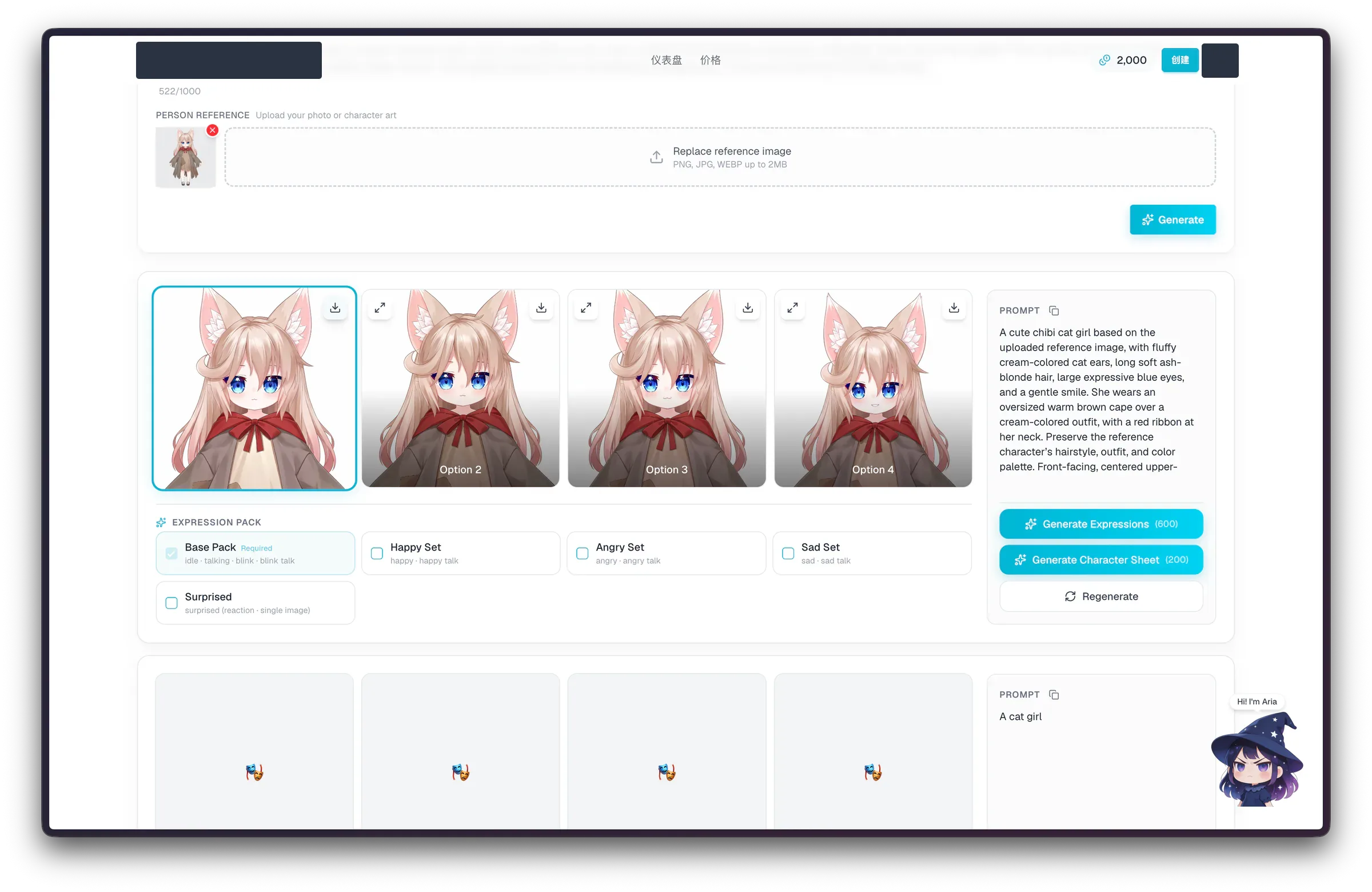
I selected the first portrait, outlined in turquoise.
At this size, I could recognize the character immediately. The face and ears were much easier to see than in the small full-body reference thumbnail. I did not compare the outfit details at full resolution.
Generating the Base Pack
After choosing the portrait, I left the required Base Pack selected. The other expression sets were optional, and I left them unchecked.
| Pack | States listed in the interface | Selection |
|---|---|---|
| Base Pack | idle, talking, blink, blink talk | Required and selected |
| Happy Set | happy, happy talk | Unchecked |
| Angry Set | angry, angry talk | Unchecked |
| Sad Set | sad, sad talk | Unchecked |
| Surprised | surprised reaction, single image | Unchecked |
The button read "Generate Expressions (600)." A separate character sheet cost 200 credits, and there was also a Regenerate button. I went ahead with the Base Pack.
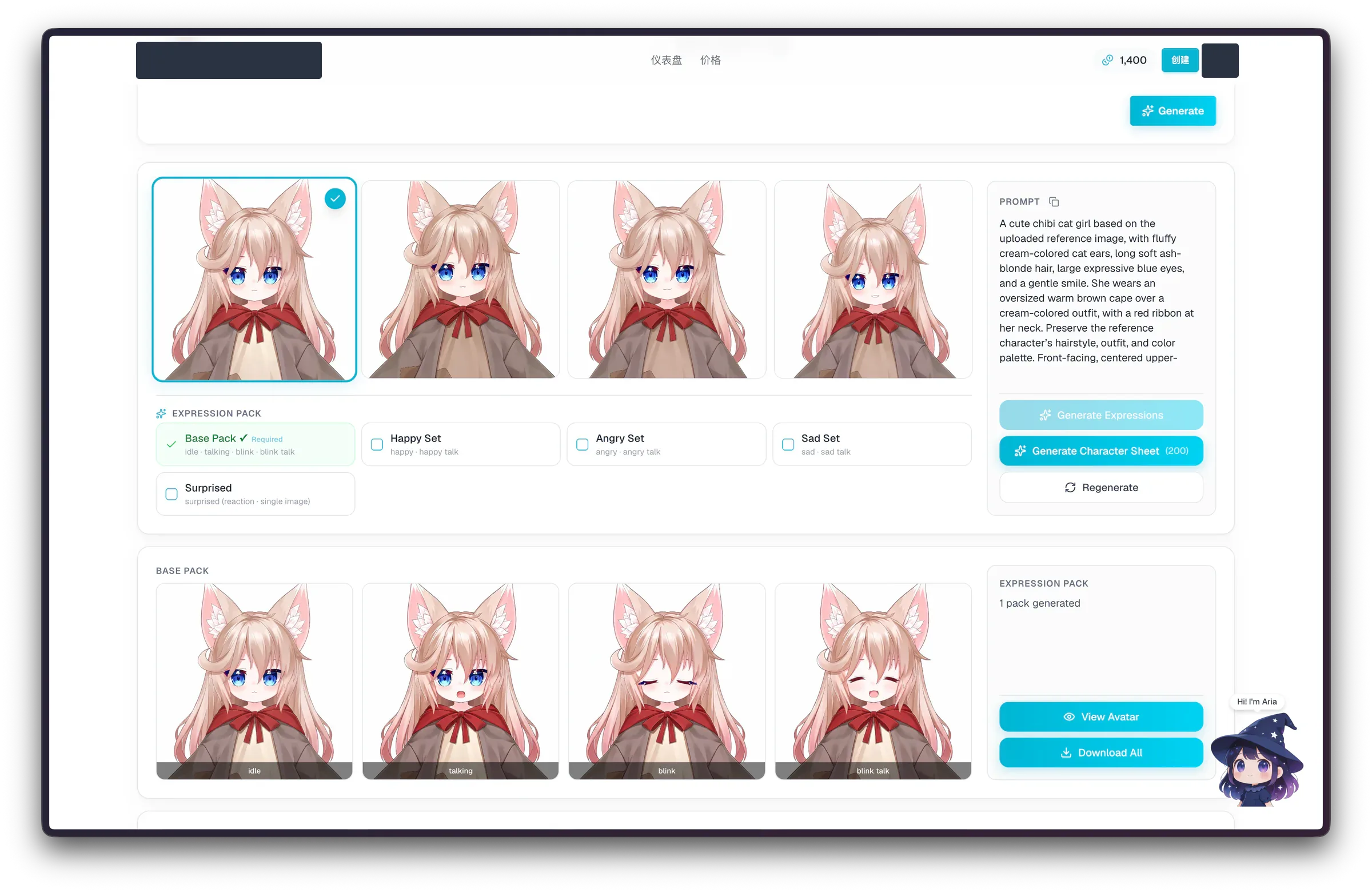
The completed pack had four states, with View Avatar and Download All beside it.
The four images covered eyes open or closed and mouth open or closed:
| State | Eyes | Mouth |
|---|---|---|
| idle | Open | Closed |
| talking | Open | Open |
| blink | Closed | Closed |
| blink talk | Closed | Open |
The hair, ears, ribbon, and cape stayed recognizable across the set. Most of the change was around the eyes and mouth. Unlike the four candidate portraits, these were expression states of the character I had already chosen.
My balance went from 2,000 to 1,400 credits, matching the 600-credit button. The screenshots do not establish a separate charge for generating the initial portraits.
What does one 2D avatar cost?
For the part I could verify, one four-state expression pack costs about $0.80–$1.20 in purchased credits. That is the cost of turning the selected portrait into idle, talking, blink, and blink-talk states. The screenshots do not establish a separate charge for the initial portrait, so I cannot treat this as a confirmed total price for every new avatar.
I calculated these amounts from the one-time credit prices listed on October 20, 2026: purchase price ÷ credits purchased × credits used. The range reflects different purchase sizes, assuming all purchased credits are eventually used. It is a unit-cost estimate, not an average measured across multiple generations.
| Output | Credits | Estimated cost in purchased credits |
|---|---|---|
| Four-state Base Pack for one selected portrait | 600 | About $0.80–$1.20 |
| Optional character sheet | 200 | About $0.27–$0.40 extra |
| Base Pack plus character sheet | 800 | About $1.07–$1.60, excluding any separate portrait charge |
The smallest credit purchase was $3.99. That means the checkout payment can be higher than the share of credits used for one avatar. I generated only the Base Pack; I did not generate the character sheet or price all optional emotion sets.
New users receive 1,000 welcome credits. An unspent welcome balance covers the tested Base Pack and leaves 400 credits, or 200 after adding a character sheet. The free trial also listed one avatar generation with four candidates and 512px PNG export. My screenshot’s 2,000-credit balance was not the standard signup gift.
Trying the 2D avatar solution’s live preview
The avatar page named the result "Cute Chibi Cat Girl" and showed a creation date of October 20, 2026. A larger Live Preview sat above the expression thumbnails, with Demo and Mic modes in the corner.
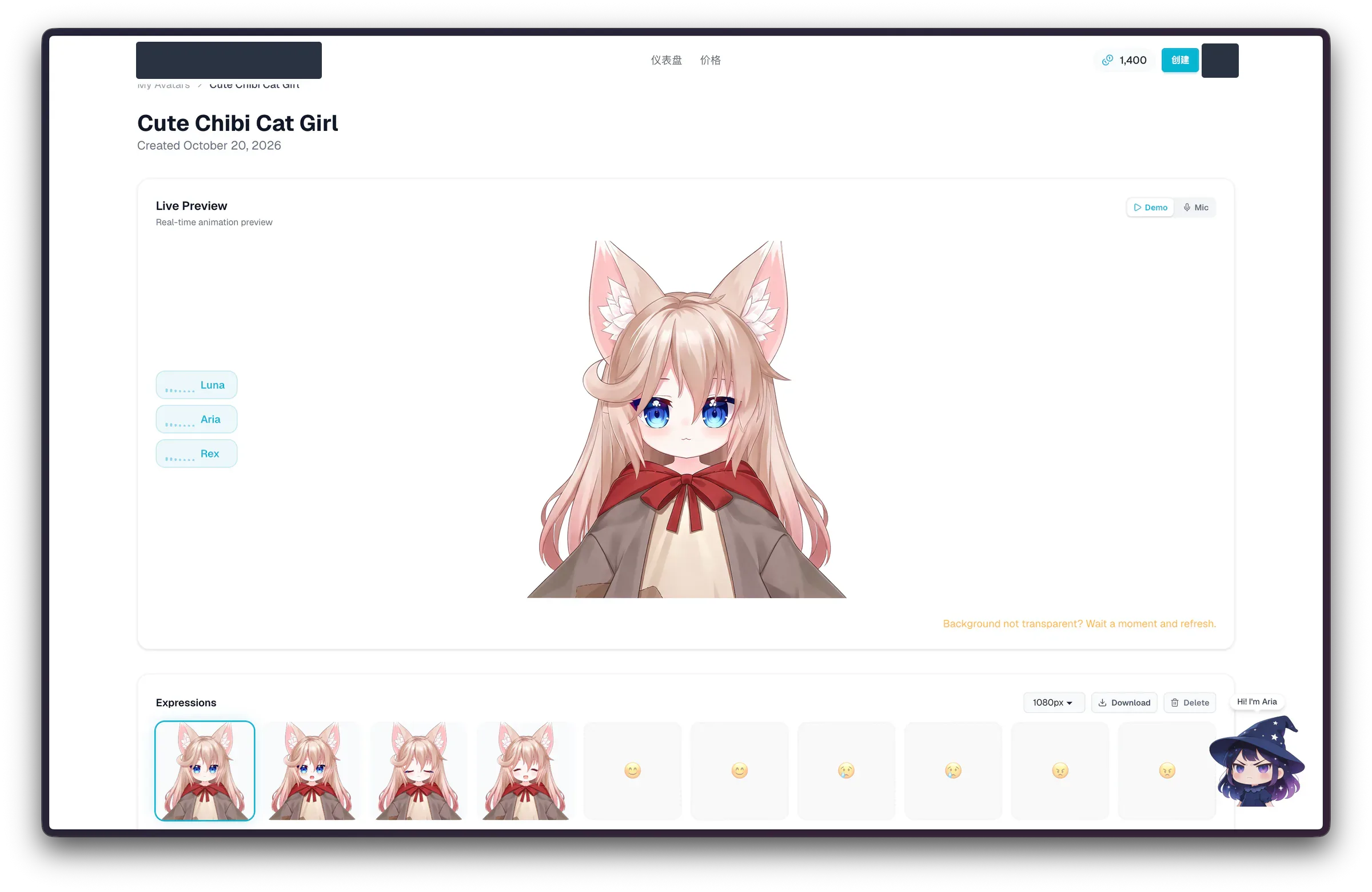
Demo mode is selected. The four base expressions are present; the other emotion slots are placeholders.
The larger preview made the face and clothing easier to inspect. There were also buttons labeled Luna, Aria, and Rex beside it. Above the expression strip, the export selector was set to 1080px, with Download and Delete controls nearby.
An orange message said, "Background not transparent? Wait a moment and refresh." The preview itself had a light background. I could not use that view alone to judge transparency in the exported PNGs.
Connecting the 2D avatar solution to OBS
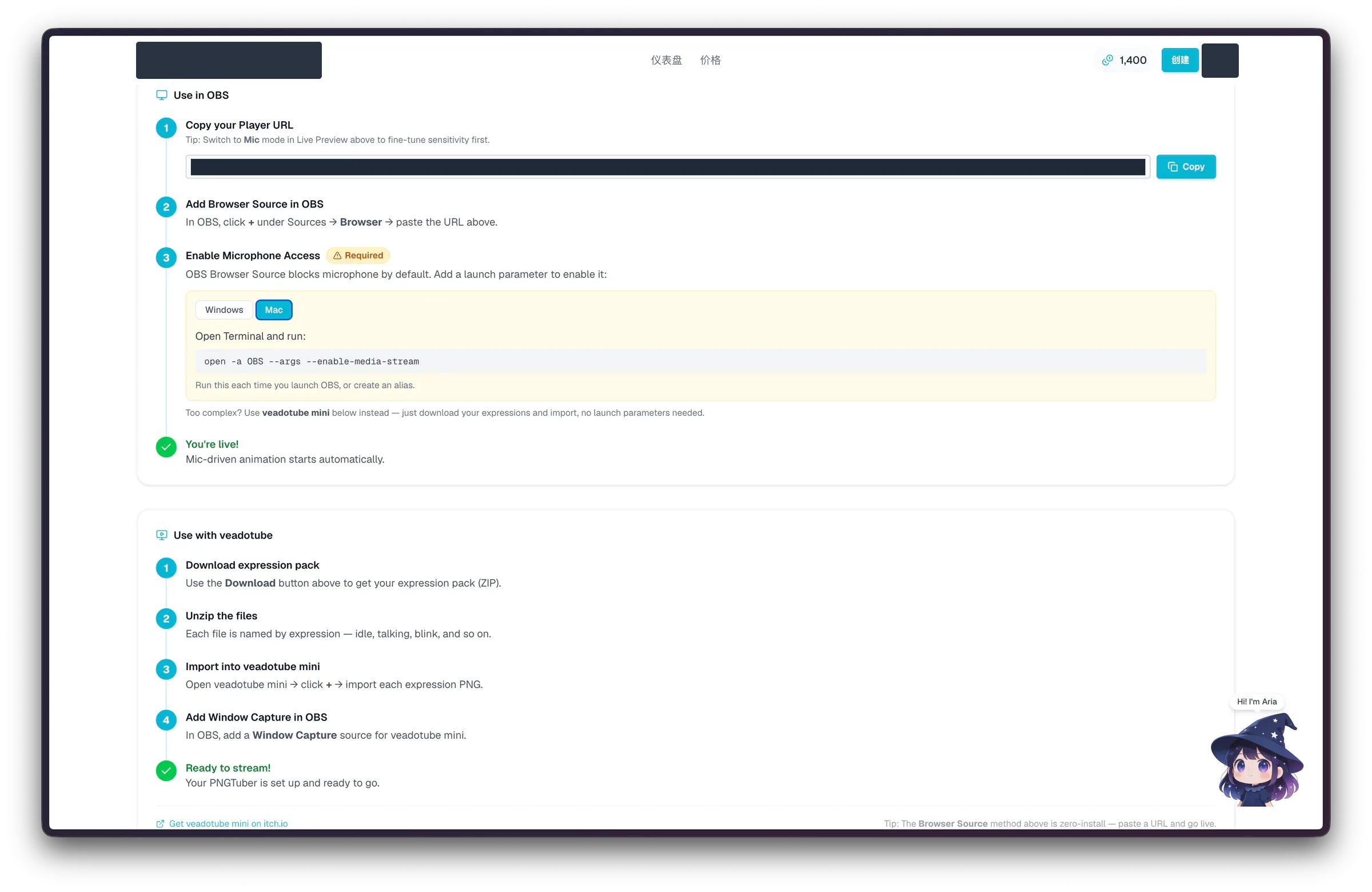
The setup page offers an OBS player link and a veadotube mini route. The private Player URL is covered.
The player URL
The page's OBS instructions were:
- Switch to Mic mode in Live Preview to adjust sensitivity, then copy the Player URL.
- Add a Browser source in OBS and paste the URL.
- Enable microphone access for the Browser Source.
That last step was marked Required. On the Mac tab, the site gave this launch command:
It said to use the command each time OBS starts, or create an alias. I am reproducing the site's instructions here; I did not separately verify the command's behavior across OBS versions.
The veadotube mini option
The other route was to download the expression ZIP, unzip it, and import each PNG into veadotube mini. The instructions then called for an OBS Window Capture source for veadotube mini. This gives you a way to use the downloaded images through another app.
The result in OBS
Here is the 5.38-second recording in OBS 32.2.2, including the canvas, source list, and mixer:
The portrait sits in the middle of the black canvas. Her mouth switches between open and closed while the overall pose stays largely fixed. That was the result I wanted from this part of the test: the selected portrait displaying expression changes in OBS. I did not measure microphone delay.
The 2D avatar solution and Virmii at a glance
Here is how the two workflows compare in this test. The Virmii walkthrough follows below.
| What matters | The 2D avatar solution | Virmii |
|---|---|---|
| Result | Four portrait candidates; I chose one for a reactive PNG avatar | A full-body 3D model shown in a VRM 1.0 preview |
| Input used | Reference image plus a prompt requesting an upper-body portrait | Full-body reference image |
| Image upload limits shown | PNG, JPG, or WebP, up to 2 MB | PNG, JPG, or WebP, at least 256 px and up to 10 MB |
| Expression step | Four completed Base Pack states: idle, talking, blink, and blink talk | Separate AI expression generation; captured at 0/13, with facial changes visible in the later OBS clip |
| Listed generation cost | 600 credits for the tested Base Pack; character sheet costs another 200 | 50 credits for a model attempt plus 20 for an expression attempt, before included subscription allowances |
| Estimated cash cost | About $0.80–$1.20 for the tested Base Pack; any separate portrait charge is unconfirmed | About $4.37–$7.99 for one model attempt plus one expression attempt |
| OBS setup | Player URL in a Browser Source; the Mac guide includes a microphone-enablement command | Create a private OBS URL in Live Studio, then enable tracking and keep the studio open |
| Files and use outside the website | Downloadable expression PNGs; the site provides a veadotube mini guide | VRM download; AI expression artwork stays in Virmii's previews, Live Studio, and OBS source |
| Recorded OBS behavior | Mouth-state changes in a largely fixed portrait | Facial and head-pose changes on the full-body avatar |
The credit counts use different rates, and I chose different framing for the two inputs. Neither column is a timing benchmark.
Creating a 3D avatar in Virmii
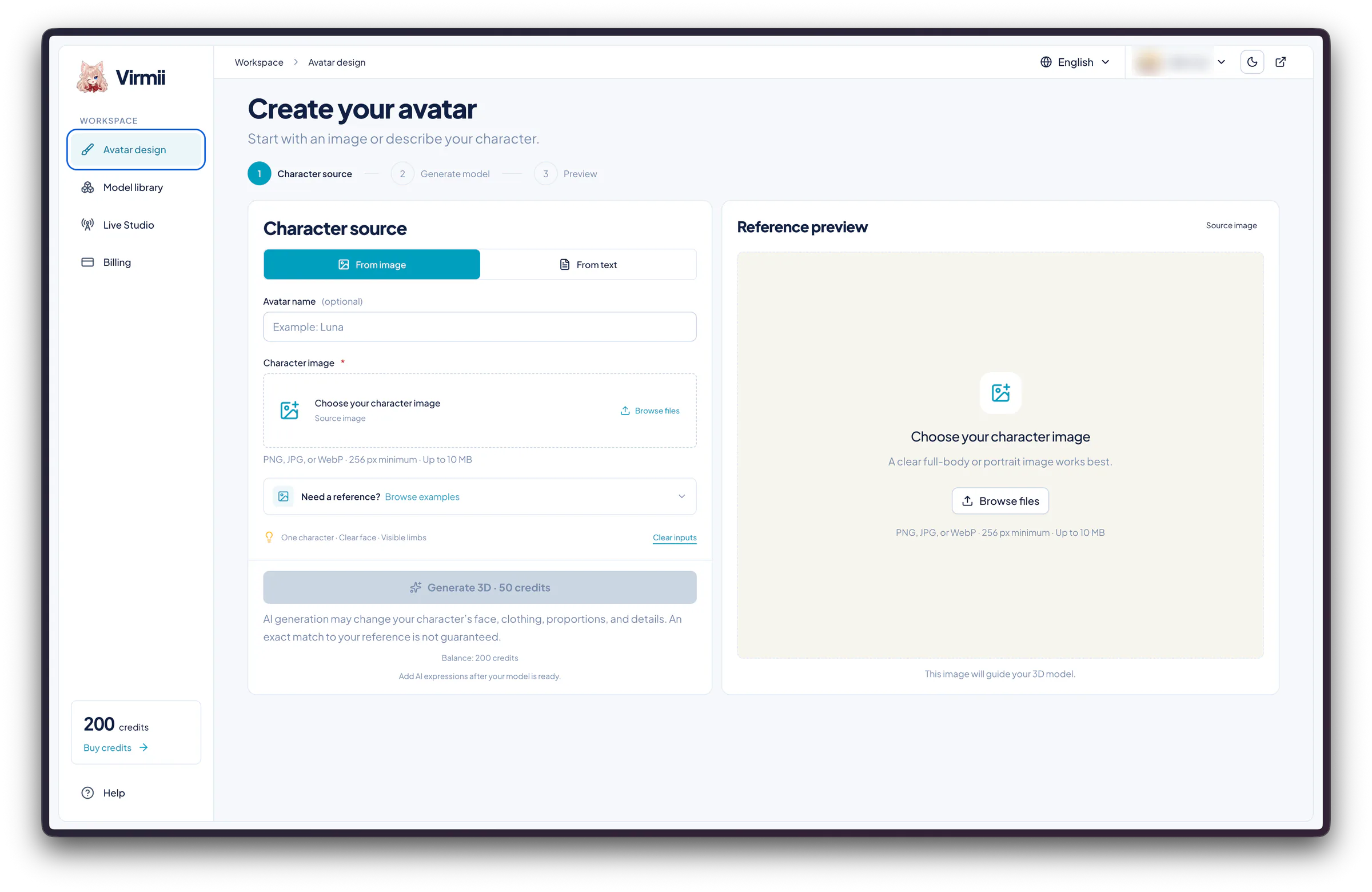
Before uploading anything, the creation form shows "Generate 3D · 50 credits."
For Virmii, I used the full-body reference of the same character. Model generation cost 50 credits, with AI expressions available as a separate step once the model was ready.
The different framing matters when looking at the results side by side. I asked the 2D avatar solution for a portrait; here I wanted a 3D version of the whole character.
Uploading the reference
In Avatar design, I selected From image and named the avatar virmii-test. The reference was a 0.82 MB PNG. A From text option was available too, but I did not use it.
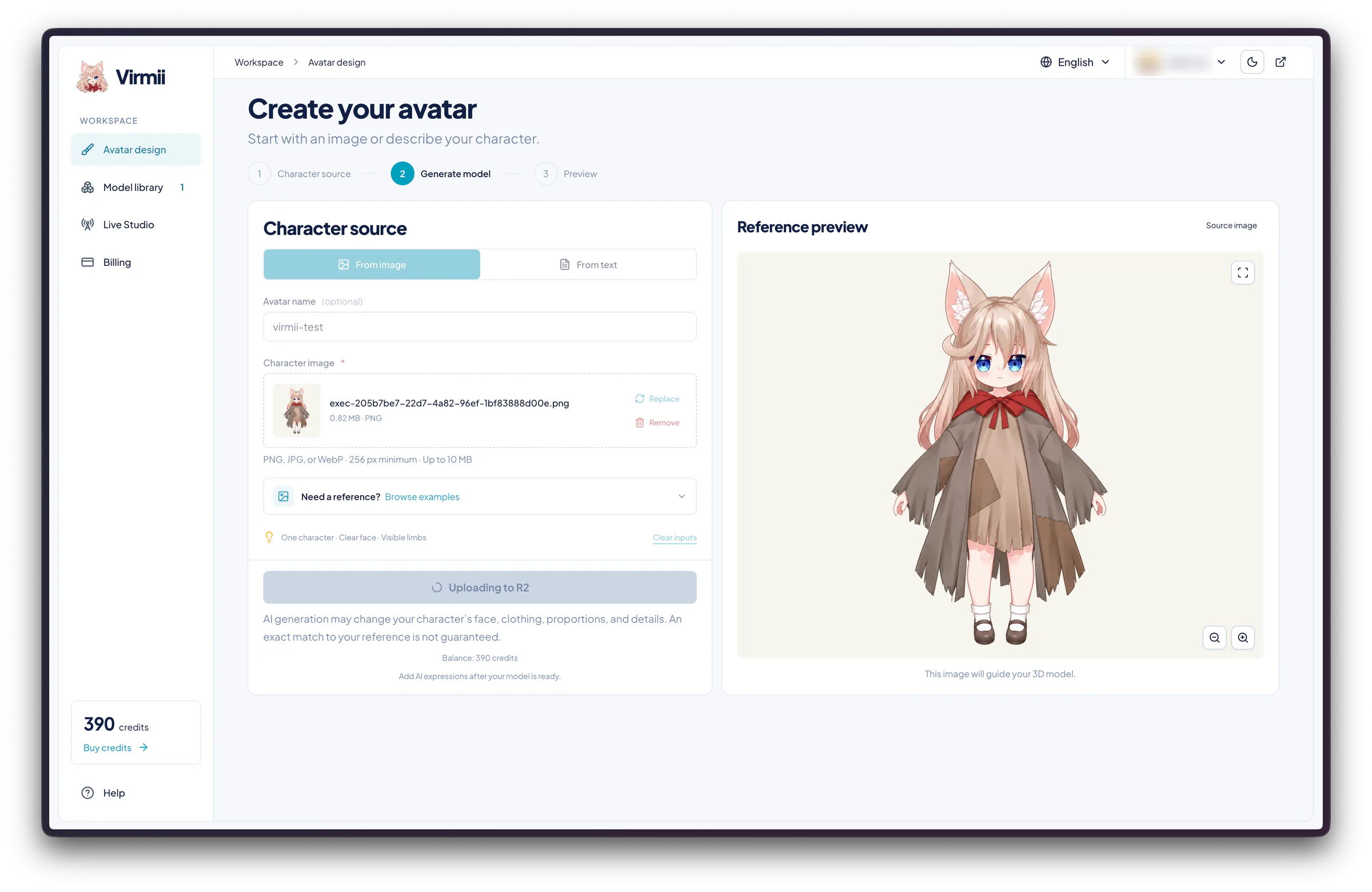
The upload is in progress, with the full-body reference on the right.
Virmii accepted PNG, JPG, and WebP files, with a 256 px minimum and a 10 MB limit. It recommended a single character with a clear face and visible limbs. The limit was higher than the 2D avatar solution's 2 MB, though my file fit comfortably within both.
The form also warned that AI generation could change the face, clothes, proportions, and other details. The finished model did have some visible differences, which I describe below.
Waiting for the model
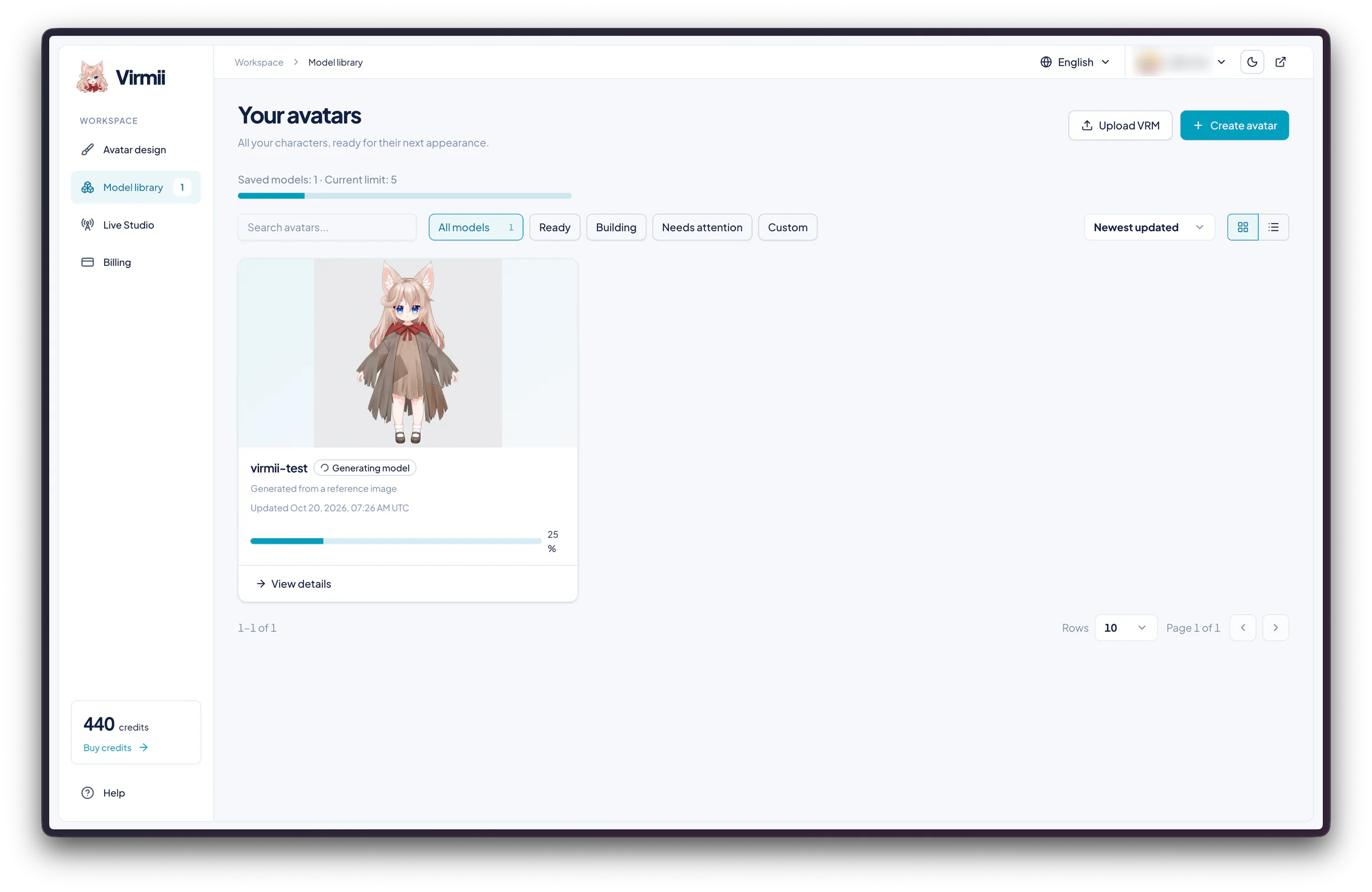
The Model library showed one saved model out of a limit of five. Its card said "Generating model" at 25%, with a link to the detail view.
The detail page also showed 25%. The large image was still the reference illustration. AI expressions were marked "Not generated," and their generation button stayed disabled until the VRM was ready.
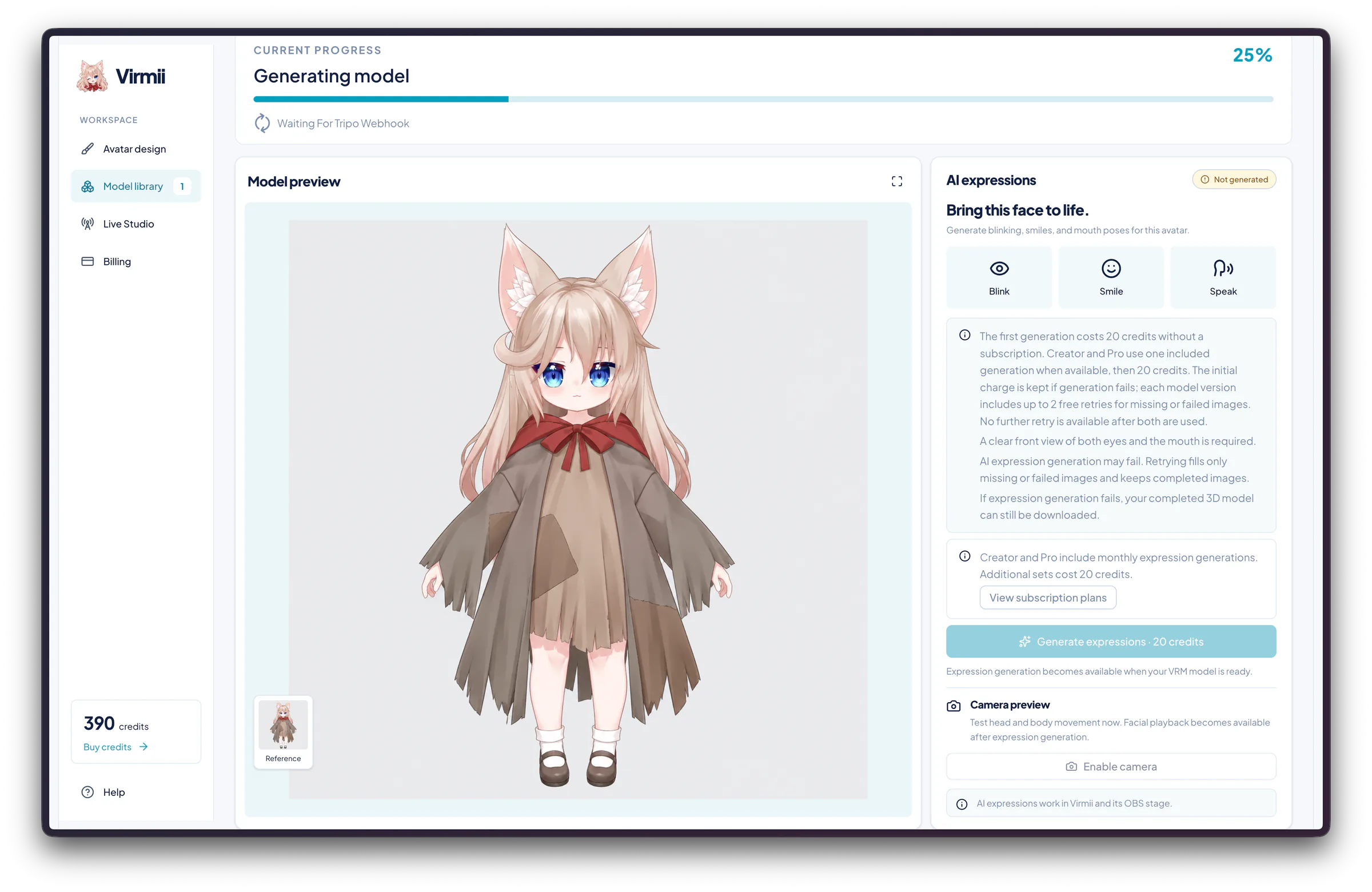
This is the reference illustration during generation. The next image shows the finished 3D model.
I did not record a reliable generation time, so these progress screenshots should not be read as a speed comparison.
What changed in 3D
The finished preview was labeled VRM 1.0. The cat ears, blue eyes, long hair, and red bow were easy to recognize. The layered brown clothes, pale socks, and dark shoes carried over too.
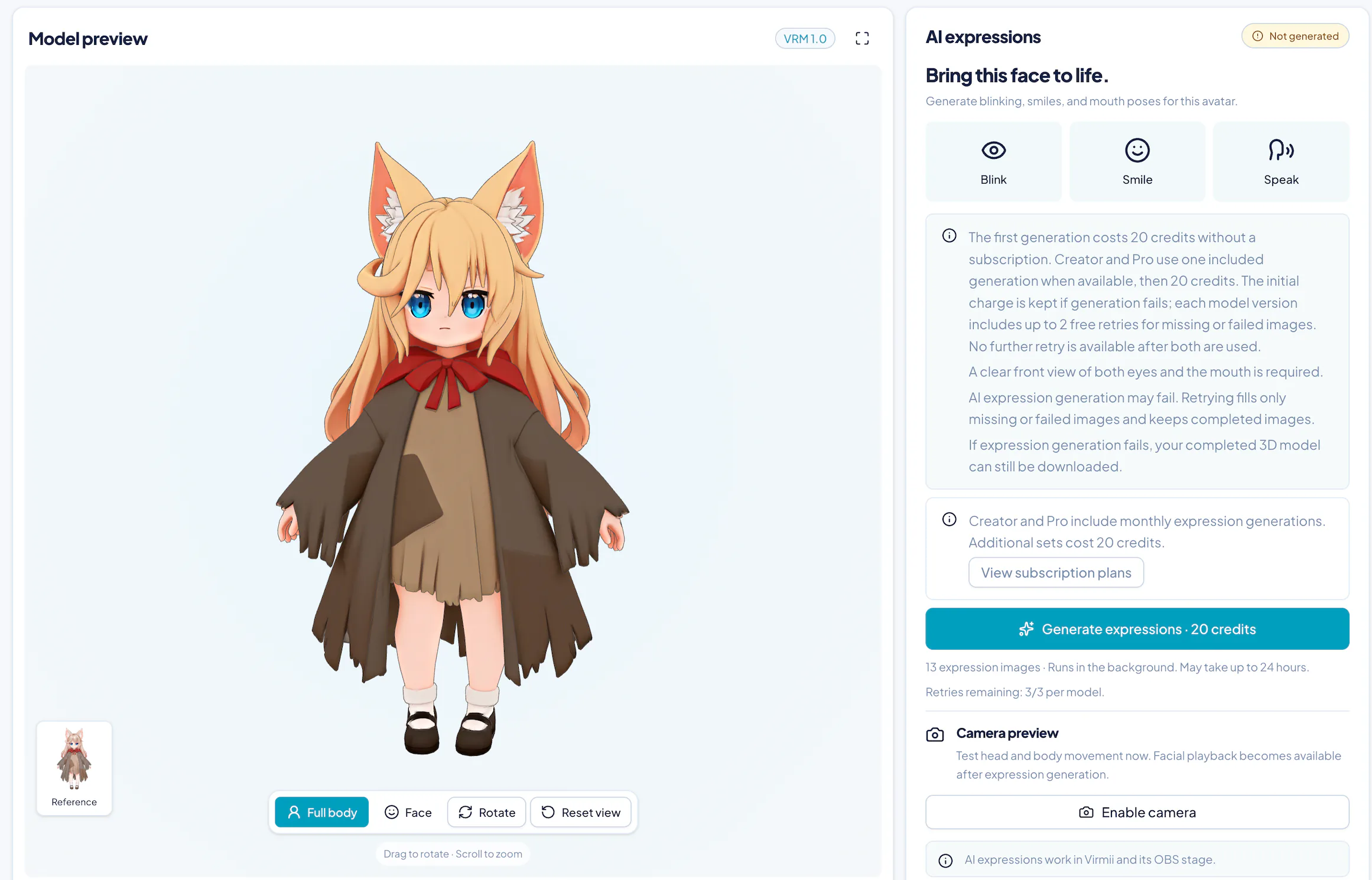
The hair was the most obvious change: pale and softly shaded in the reference, warmer and more golden in the model. The clothing had simpler folds and broader patches of color. I could recognize the design, but the finish was different from the illustration.
Full body, Face, Rotate, and Reset view controls sat below the preview. The page also listed dragging to rotate and scrolling to zoom, with the reference thumbnail still in the corner. The image above shows the front; it does not document the sides or back.
Adding AI expressions
The ready model still needed a separate expression step. The panel listed Blink, Smile, and Speak, with a 20-credit generation button.
Its terms were specific:
- Without a subscription, an initial set costs 20 credits. Creator and Pro use an included generation first when one is available.
- The initial charge is kept if generation fails. Each model version has up to two free retries for missing or failed images; completed images are kept.
- Both eyes and the mouth need to be visible from the front. If expressions fail, the completed 3D model can still be downloaded.
That makes 70 credits for one model attempt from an existing image plus one expression attempt, before any included subscription allowance. I am adding the two displayed prices here, not inferring the total from changes in my account balance. The two services also use different credit rates, so 70 Virmii credits cannot be compared directly with 600 credits in the 2D avatar solution.
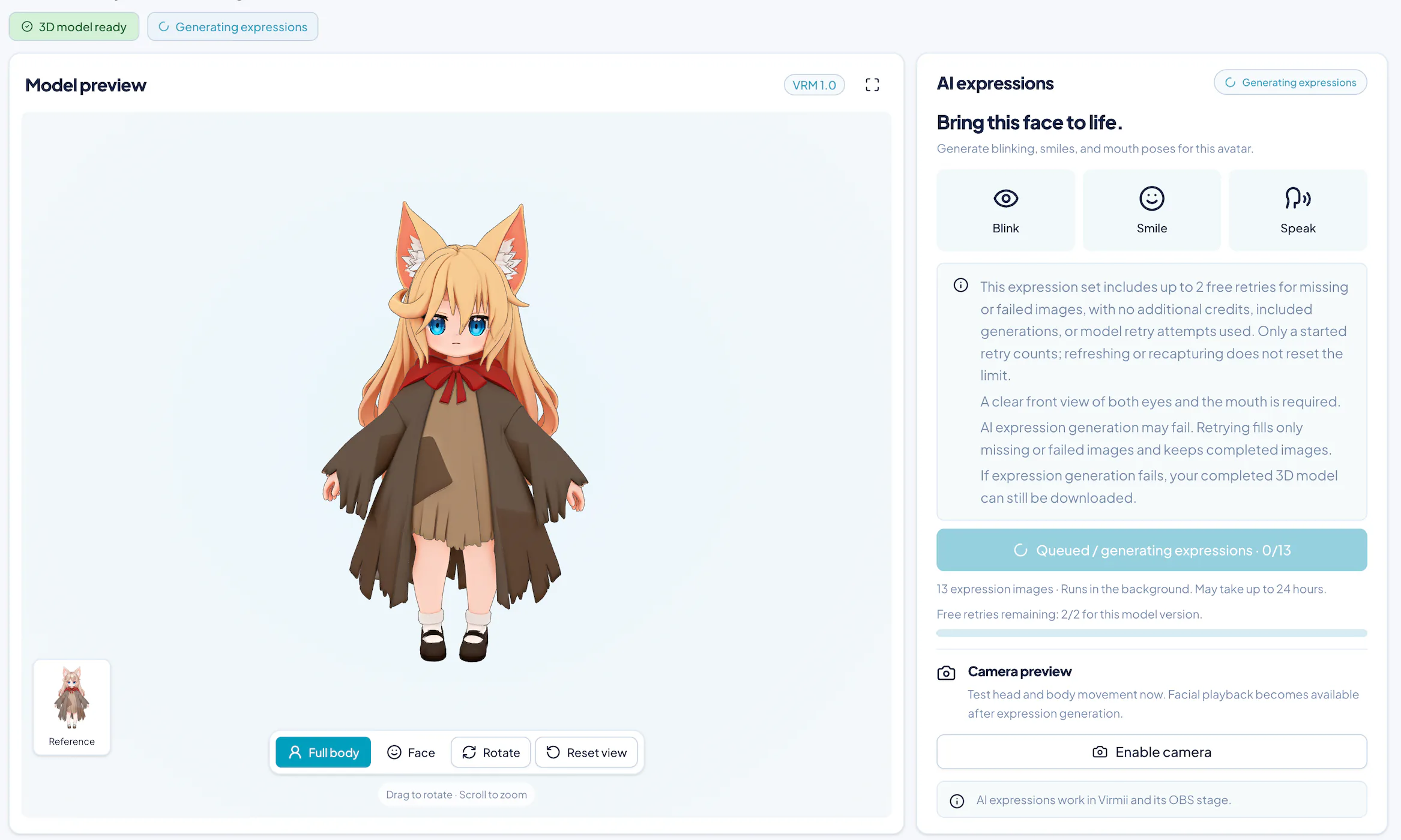
After I started expressions, the job showed 0/13 with two free retries remaining. The 3D model was already ready.
The page said the 13 expression images would generate in the background and could take up to 24 hours. That was the stated allowance, not a measured wait in this test.
An Enable camera button was available, with a note that head and body movement could be tried before facial playback was ready. I have not included a screenshot of all the completed expressions. The later OBS clip shows the avatar's visible facial changes.
What does one Virmii model cost?
Using an existing reference image, one 3D model attempt plus one AI expression attempt works out to about $4.37–$7.99 at the one-time credit rates listed on Virmii's pricing page on October 20, 2026. A model attempt uses 50 credits; adding expressions uses another 20. These USD estimates are before tax.
| Output | Credits | Estimated cost in purchased credits |
|---|---|---|
| One 3D model attempt | 50 | About $3.12–$5.71 |
| One AI expression attempt | 20 | About $1.25–$2.28 extra |
| One model attempt plus one expression attempt | 70 | About $4.37–$7.99 |
For a single purchase, $7.99 buys exactly the 70 credits needed for one model-and-expression attempt. If the full balance is used across several characters, the larger purchases bring that average to $6.00 each for three attempts, or about $4.37 each for eight. The lower unit price requires a larger upfront payment.
These figures describe attempts, not a guaranteed finished character. Regenerating a model or starting another paid expression set increases what you spend on the character you eventually keep. The expression step includes up to two free retries for missing or failed images, as described above. Subscription allowances can change the effective cost; they are not included in this calculation.
Tracking, OBS output, and downloads use no extra credits. AI expression artwork is not embedded in the downloaded VRM; it works in Virmii's previews, Live Studio, and OBS source.
Setting up Virmii Live Studio
Live Studio opened with the full-body avatar on the left and controls on the right. Under the preview was a status strip for the camera, face detection, tracking FPS, and live output.
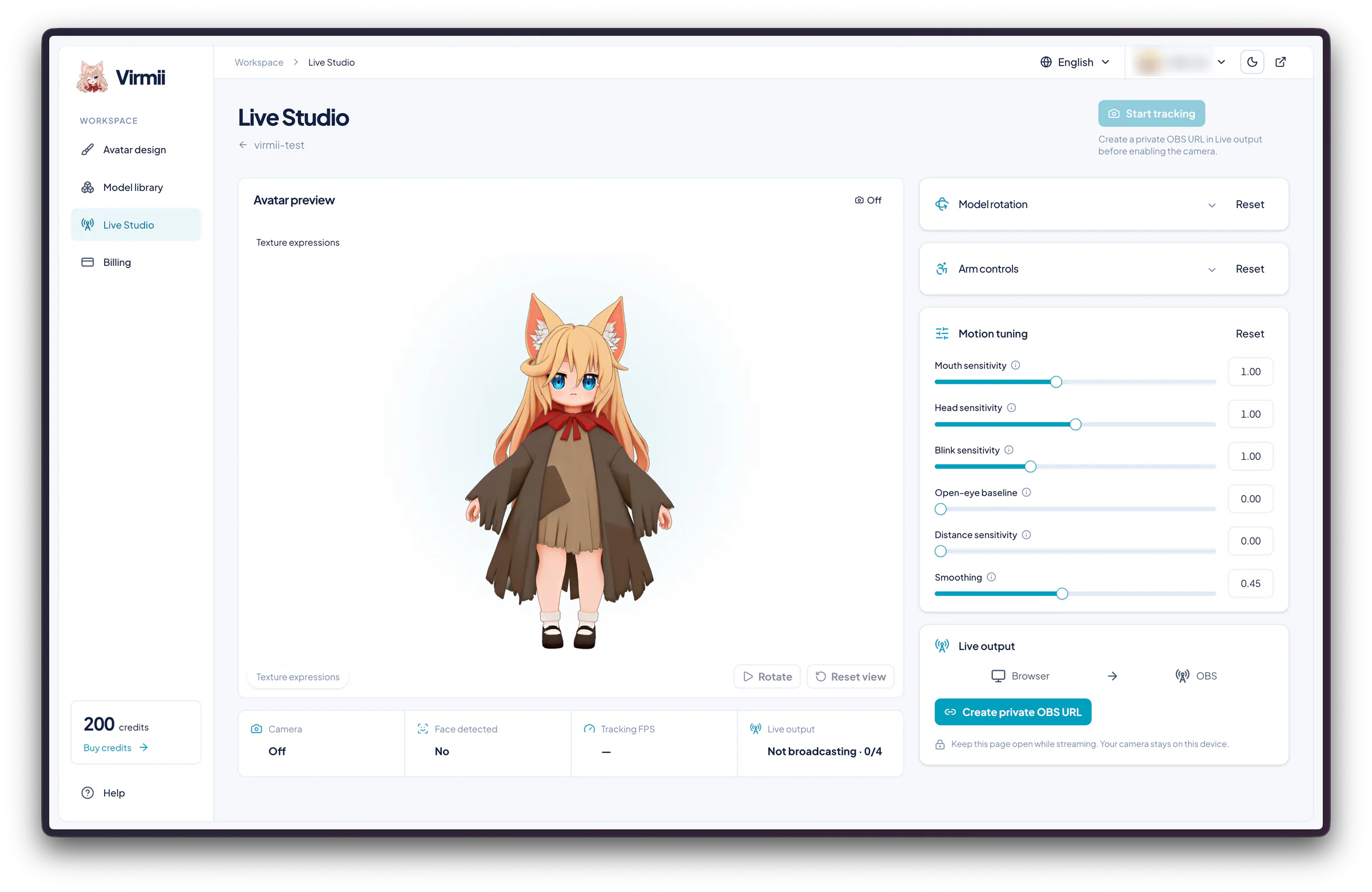
Start tracking is disabled until a private OBS URL has been created.
Motion controls
Model rotation and Arm controls were collapsed in these screenshots. Motion tuning was open, with these values:
| Setting | Value shown |
|---|---|
| Mouth sensitivity | 1.00 |
| Head sensitivity | 1.00 |
| Blink sensitivity | 1.00 |
| Open-eye baseline | 0.00 |
| Distance sensitivity | 0.00 |
| Smoothing | 0.45 |
The controls were beside the preview, with Rotate and Reset view below the character. I did not run a separate comparison of sensitivity settings, so I am listing these as the setup values rather than recommended settings.
Creating the OBS URL
The Live output panel told me to create a private OBS URL before enabling the camera. Once I did, Start tracking became available. The panel then showed Copy URL, Open stage, Reset URL, and Disable.
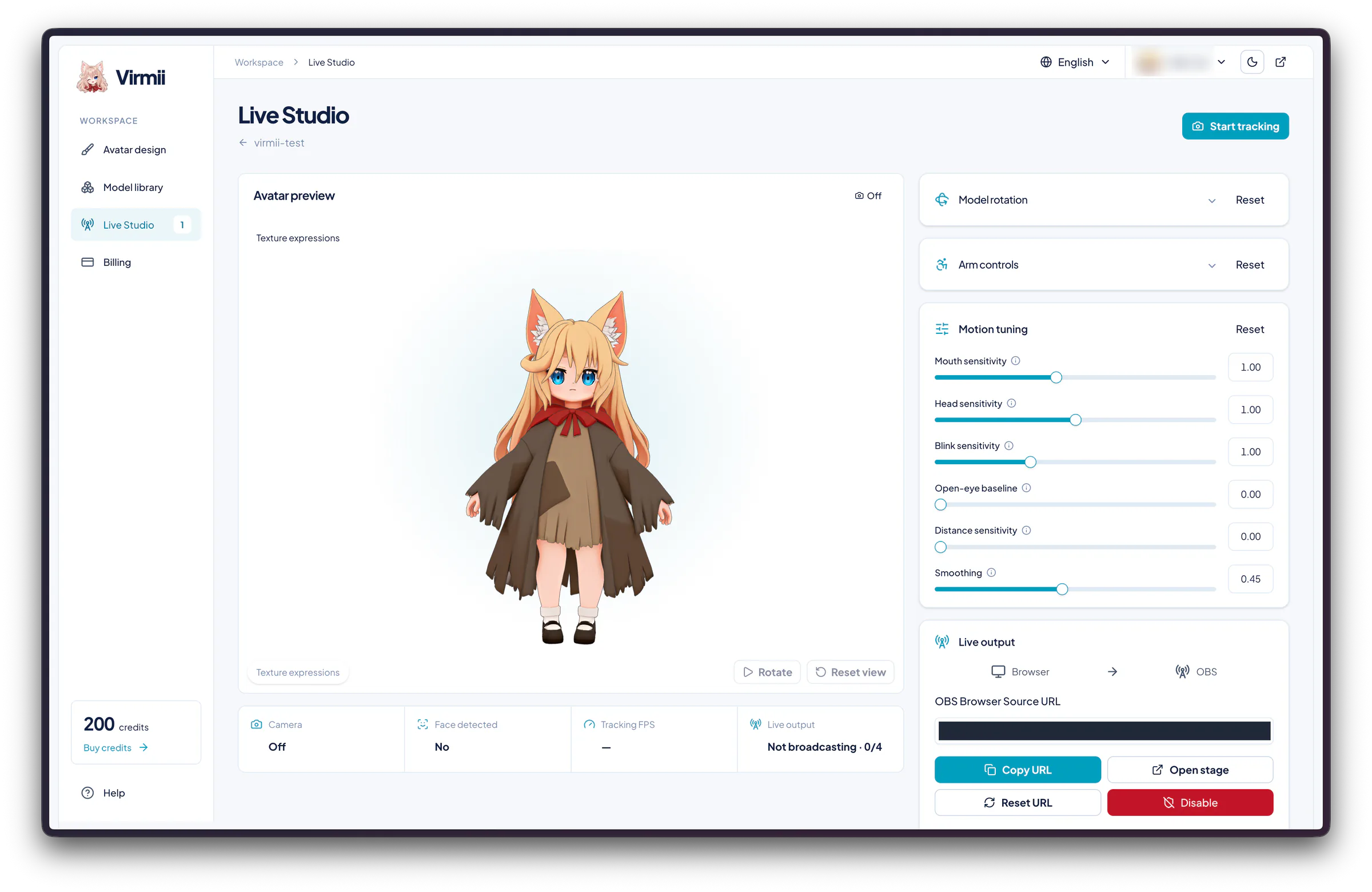
The output URL is ready and has been covered in this screenshot. Camera tracking is still off.
Both setup screenshots show Camera: Off, Face detected: No, Tracking FPS: —, and Live output: Not broadcasting · 0/4. Creating the URL did not itself start tracking or broadcasting.
The page also said to keep Live Studio open while streaming and that the camera stays on the device. Compared with the 2D avatar solution's player-link guide, Virmii puts the motion settings and output-link controls together in the studio. Both provide a URL for an OBS Browser Source.
Virmii on the OBS canvas
Here is the final Virmii recording. I cropped out the system menu bar and OBS controls, leaving the canvas and the original sequence. The clip is about 6.6 seconds, exported as a 1600 × 936, 60 fps MP4.
The whole character stays in view against the black background. Her eyes, mouth, and head pose change during the clip. The recording shows the avatar moving in OBS, but without the performer's face alongside it, I cannot judge how closely each movement matched the input.
What I would choose from these results
The clearest difference was the artwork. The 2D avatar solution kept a soft illustrated look. Virmii gave the character a solid 3D form, with warmer hair and simpler clothing folds. Both were recognizable versions of the reference.
For a portrait that switches between speaking and silent states, the result from the 2D avatar solution fits that job. For a 3D version of the character with a VRM download and controls in Live Studio, Virmii is the relevant workflow. Its separate AI expressions stay within Virmii's own playback surfaces, which matters if you intend to use the downloaded model elsewhere.
I would not choose between them by raw credit count or by how much of the body appears in these examples. Credit prices differ, and I chose the framing. I also have not tested long-session stability or measured tracking delay. If you are still choosing the type of avatar you want, the PNGTuber, Live2D, and 3D comparison covers that decision in more detail.
FAQ
What is the main difference between the 2D avatar solution and Virmii?
In this test, the 2D avatar solution generated a portrait and separate PNG states for talking and blinking. Virmii generated a 3D avatar with a VRM download and a Live Studio page for tracking and OBS output. Start with the kind of avatar you want to use on stream.
Can I try the 2D avatar solution without buying credits?
New users receive 1,000 welcome credits. The four-state Base Pack tested here cost 600, so an unspent welcome balance covers it and leaves 400. The separate character sheet costs 200. I did not test the cost of adding every optional emotion set.
Do I need a subscription to use either tool?
Both offer one-time credit purchases, so a subscription is optional. The cost estimates above use those purchase rates and assume the balance is fully used. Subscription allowances and unused credits would change your actual average cost.
Can both avatars appear in OBS?
Yes. The recordings above show both results on the OBS canvas. The 2D avatar solution supplies a Player URL and also documents a veadotube mini setup using downloaded PNGs. Virmii supplies a private OBS Browser Source URL through Live Studio. My clips show visible movement; they do not measure delay or prove that either setup will remain stable for a full stream.
Does Virmii include its AI expression artwork in the downloaded VRM?
No. The AI expression artwork works in Virmii previews, Live Studio, and Virmii's OBS Browser Source. It is not embedded in the VRM download, so the expressions shown in Virmii should not be assumed to carry over to another VRM application.
How much should I budget for one avatar?
At the one-time purchase rates checked for this test, budget about $0.80–$1.20 in credits for the 2D solution's four-state Base Pack, or about $4.37–$7.99 for a Virmii 3D model attempt with one expression attempt. The 2D figure does not confirm the cost of the initial portrait. Welcome credits may cover the first 2D Base Pack; extra paid attempts increase either workflow’s total. These are different outputs, and their credit counts are not directly comparable.