Tutorials
How to Become a VTuber in 2026: A Beginner’s Guide
A complete beginner's guide on how to become a VTuber in 2026. Learn character design, 2D vs 3D models, tracking software, OBS Studio setup, and streaming tools.
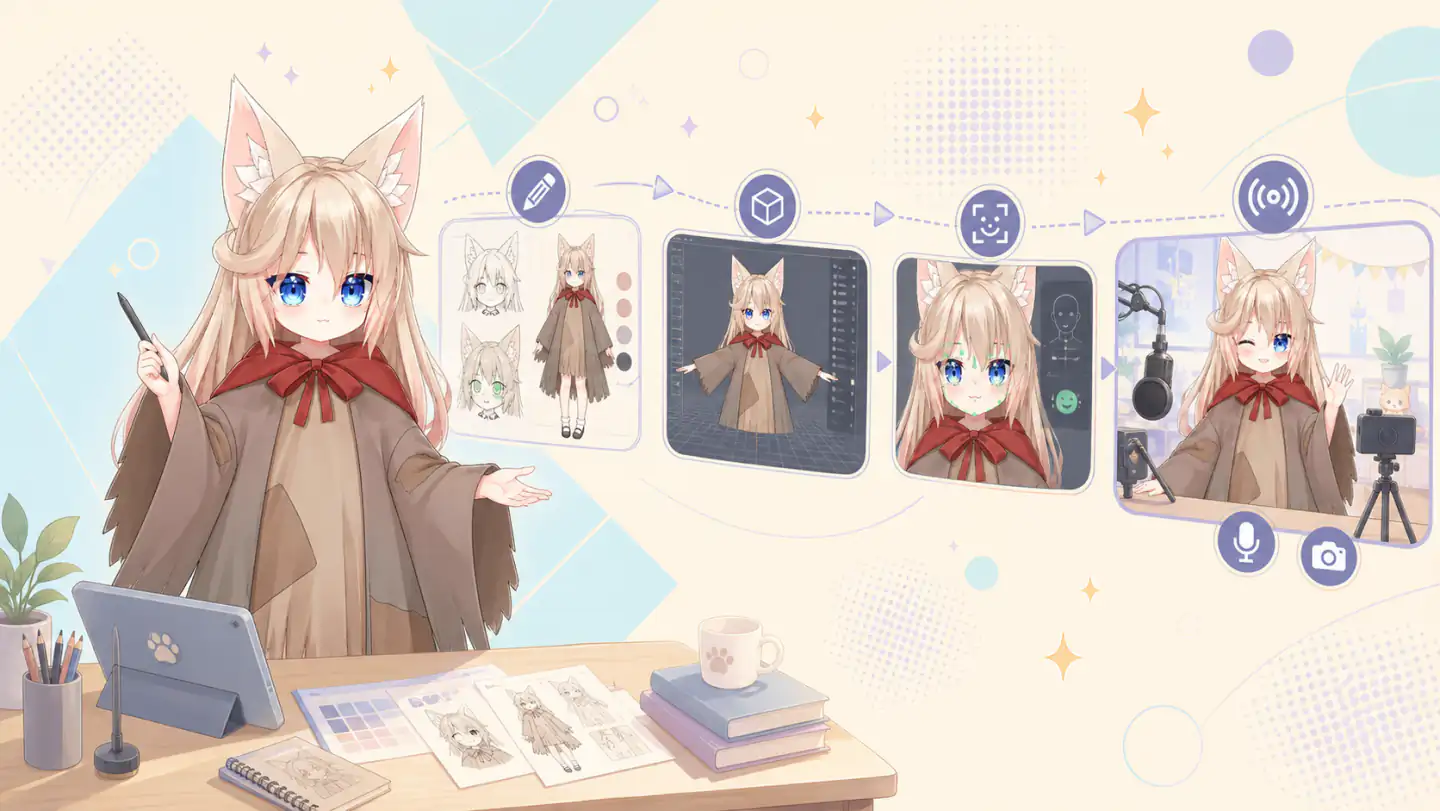
Understanding VTubing in 2026: What It Is and How to Start
Learning how to become a VTuber (Virtual YouTuber) means operating a digital avatar driven by real-time motion capture or face tracking technology to present content online. We view VTubing as an expressive medium that allows creators to build engaging online identities, maintain personal privacy, and stream to global audiences without ever showing their physical face.
If you are evaluating what do you need to be a VTuber today, the barrier to entry has never been lower. Historically, launching a virtual persona required specialized hardware, GPU-heavy desktop software, and thousands of dollars for custom character rigging. In 2026, the industry has shifted dramatically toward accessible browser-based tracking and AI-assisted workflows, allowing absolute beginners to start streaming without high-end equipment or massive budgets.
Platforms like Virmii eliminate modern technical complexity by offering browser face tracking and AI reference input directly inside web-based tools. By streamlining VRM avatar management and lowering the required technical depth, new creators can set up their virtual presence quickly without wrestling with local software dependencies or reading through manual code examples. Understanding how to start VTubing is now a matter of choosing your concept, configuring your software, and going live.
Conceptualizing Your Character Persona and Reference Sheet
Before building a 3D avatar, establishing a cohesive VTuber persona and character reference sheet provides the essential visual and thematic foundation for your channel. Defining your identity early ensures that downstream avatar modeling, rigging, and face tracking align directly with your overall streaming goals.
To develop memorable VTuber design ideas, start by outlining core character traits across four main categories:
- Theme and Lore: Determine whether your identity is a fantasy creature, sci-fi android, cozy modern streamer, or casual gaming enthusiast with a distinct backstory.
- Personality and Voice: Define how your character speaks, reacts, and interacts with chat during live broadcasts.
- Color Palette: Select two to three dominant colors alongside a high-contrast accent color to make your visual presence instantly recognizable on streaming feeds.
- Key Silhouettes: Choose signature accessories, hair shapes, or outfits that retain a strong recognizable profile even in small stream overlay windows.
Once your visual direction is clear, assemble a formal character reference sheet detailing front, back, profile, and facial expression views (such as neutral, happy, angry, and surprised). If you are using AI-assisted tools like Virmii's AI reference input feature, you can generate structured concept art directly from prompt descriptions before drafting final model geometry. Having distinct front and back reference layers simplifies standard VRM avatar management and ensures accurate proportional mapping.
A common mistake among beginner creators is overcomplicating design elements with excessive floating accessories, heavy multi-layered garments, or dense hair strands before testing real-time motion capture. Complex physical props can cause severe visual clipping, performance slowdowns, or tracking glitches. Testing simple base meshes early through browser face tracking allows you to verify facial blendshape responses before finalizing intricate character designs.
Choosing Your Avatar Format: PNGtuber, 2D, or 3D Models
Selecting the right avatar format depends on your budget, hardware constraints, and production goals when deciding how to become a VTuber. Avatar options range from lightweight audio-reactive graphics to spatial three-dimensional models, each offering distinct levels of physical expression and real-time responsiveness.
A PNGtuber setup provides an accessible low-barrier entry point by using audio voice activity triggers to switch between static state images. While a PNGtuber setup requires no webcam or tracking hardware, it lacks fluid facial mirroring and rotational head movement.
When comparing 2D vs 3D VTuber models, 2D Live2D setups offer meticulous hand-drawn art rigged across flat deformation layers, whereas 3D VRM models grant true spatial rotation, dynamic lighting, and versatile camera positioning. Traditional pipelines for Live2D vs VRM require manual rigging and localized software environments, but browser-native systems and AI reference input tools now streamline VRM avatar management and browser face tracking. By abstracting away steep technical depth and setup overhead with web-ready configurations and optional integration code examples, creators can deploy interactive models directly within the browser.
Creating or Commissioning Your VTuber Model
We can create a 3D VTuber model using dedicated desktop applications, automated AI tools, or bespoke custom commissions from 3D artists. Depending on your budget and technical expertise, you can assemble an avatar manually or accelerate VRM avatar creation using browser-native generation systems.
For creators taking a hands-on manual approach, free tools like VRoid Studio provide detailed humanoid base meshes, hair sculpting features, and customizable texture layers. Alternatively, creators can streamline production by using Virmii as an AI VTuber model generator. By supplying an AI reference input, our system automatically synthesizes character features, applies texture mapping, and generates stream-ready 3D files directly inside your web browser without complex manual rigging.
Once model creation or commissioning is complete, validating your asset specifications is critical for preventing animation glitches during live broadcasts. Adhering to standardized humanoid bone structures detailed in the official VRM documentation ensures cross-platform compatibility. Virmii simplifies post-creation validation through built-in vrm_avatar_management and browser_face_tracking features, providing high technical depth to inspect facial blend shapes and test code examples for custom hotkey triggers before going live.
Essential Hardware and Budget Breakdown for Beginners
Starting as a VTuber requires balancing the hardware requirements for VTubing against your content goals and streaming budget. A standard VTuber setup for beginners can range from a $0 free entry tier using existing browser tools and built-in webcams to $500+ intermediate configurations featuring dedicated facial tracking hardware and XLR audio gear.
System performance is critical because your computer must simultaneously process game graphics, encode the live broadcast, and run avatar rendering applications. For 3D avatar rendering alongside active gameplay, we recommend at least a multi-core CPU (such as an Intel Core i5/Ryzen 5 or higher) and a discrete GPU (such as an NVIDIA GTX/RTX series or AMD equivalent) to maintain stable framerates in broadcast software like OBS Studio.
Facial capture quality relies heavily on your camera choice. While a standard 1080p webcam provides accessible optical tracking for basic blendshapes, using an iOS device with a TrueDepth camera system delivers superior tracking precision, accurately capturing micro-expressions and eye movements. Browser-based platforms like Virmii simplify this hardware pipeline by supporting browser_face_tracking and seamless vrm_avatar_management directly within your browser window. This workflow allows creators to test concepts using ai_reference_input without configuring complex local server bridges or heavy desktop dependencies.
| Budget Tier | Recommended Hardware Setup | Facial Tracking Method | Estimated Cost |
|---|---|---|---|
| Tier 1: Free Entry | Existing PC or laptop, built-in camera, USB headset mic | Browser face tracking or basic webcam software | $0 |
| Tier 2: Starter Setup | Mid-range desktop, 1080p 60fps webcam, standalone USB microphone | Dedicated optical webcam tracking | $100 - $300 |
| Tier 3: Intermediate Studio | High-performance PC with discrete GPU, iOS device, XLR microphone and audio interface | TrueDepth depth-sensing camera tracking | $500+ |
By evaluating the true cost to become a VTuber across these components, you can choose an entry point that fits your current hardware while preserving room to upgrade your gear as your broadcast expands.
Selecting and Configuring Face Tracking Software
Face tracking software uses a webcam feed to analyze key facial landmarks, mapping expressions like eye blinks, head rotations, and mouth movements directly onto your virtual avatar's blendshapes in real time. We map these movement vectors to control your model's skeletal rig, converting video frames into fluid digital performance.
In traditional local workflows, creators rely on desktop face tracking software such as VSeeFace, OpenSeeFace, or vTuber Kit. Configuring a standard VSeeFace setup involves loading your VRM model file, selecting your video capture device, and calibrating neutral expressions. While these programs offer extensive technical depth and advanced configuration for custom bone bindings, running heavy local tracking loops alongside game clients and broadcast encoders increases overall CPU and GPU load.
To eliminate software bloat and lower hardware strain, Virmii offers browser face tracking directly inside the web interface. By offloading processing from local background utilities, Virmii integrates VRM avatar management, AI reference input, and real-time expression mapping without requiring extra software installations or custom script code examples.
To achieve smooth tracking and prevent visual glitching across any platform, environment calibration is essential. Position your camera at eye level roughly two to three feet away, ensuring consistent, soft lighting on your face to eliminate harsh shadows around the eyes and jawline.
Setting Up OBS Studio for Virtual Content Creation
To broadcast your VTuber avatar, we route your rendering software's video feed into OBS Studio using direct capture layers with alpha transparency or color keying. Refer to the OBS Studio Quick Start Guide for core software installation steps before assembling your stream canvas.
For a clean OBS VTuber setup, isolating your character from the background background is critical. Applications using local DirectX or Spout output allow Game Capture layers with 'Allow Transparency' enabled, rendering a clean transparent avatar OBS feed. When working with standard window capture, apply a Chroma Key filter to remove a green or blue background. Virmii streamlines this pipeline through browser_face_tracking and native vrm_avatar_management, delivering isolated video feeds directly inside web viewports without heavy GPU overhead.
Broadcasting high-quality audio requires separating your vocal microphone input from desktop sounds, chat applications, and background music. In OBS Studio, we configure Application Audio Capture sources for individual apps so microphone filters like noise suppression do not affect stream audio. If you intend to use your avatar outside streaming platforms, enable the OBS Virtual Camera to send your output directly into Discord or Zoom call applications.
For creators desiring technical_depth, web-based workflows can ingest custom ai_reference_input prompts and facial tracking data via real-time WebSocket payloads. Below is a minimal code_examples implementation demonstrating how blendshape data streams into a renderer:
Following this comprehensive OBS Studio guide, structure your basic scene layout with lower-third positioning for your avatar, layered over your main content capture. Place stream alert overlays, chat windows, and background music media sources on dedicated visual layers so you can hide or tweak elements mid-stream without interrupting character rendering.
Choosing Your Streaming Platform and Developing Your Brand
Selecting the right streaming platforms for VTubers depends on your content format, live interaction goals, and discovery strategy. We recommend evaluating how each platform handles audience growth before finalizing your channel infrastructure.
When learning how to start VTubing on Twitch, creators benefit from an established category directory and high live-viewer engagement, though organic live discoverability can be challenging for new streams. YouTube excels at long-term discoverability through search and video recommendations, making it optimal for creators who produce both live streams and edited VODs. Meanwhile, short-form video platforms like TikTok and YouTube Shorts provide rapid reach through algorithmic feeds, allowing virtual creators to publish quick clips, testing custom overlays or character moments to funnel viewers to scheduled live broadcasts.
Effective VTuber branding relies on unified visual assets that reflect your character concept across every touchpoint. This includes designing customized channel banners, stream overlays, chat boxes, panel graphics, and logo art. Maintaining a consistent color palette, typography, and thematic motif ensures immediate recognition across social media and broadcast schedules.
To scale your platform presence sustainably, leverage structured educational hubs such as the Twitch Creator Camp to master chat moderation, channel analytics, and community guidelines. Modern tools streamline technical depth by combining avatar workflows; for instance, Virmii provides browser_face_tracking, streamlined vrm_avatar_management, and ai_reference_input generation directly in the web browser. Reducing client-side complexity frees up broadcast overhead, enabling you to focus on community growth, content execution, and consistent branding.
Pre-Stream Testing and Launch Checklist for Your First Broadcast
Before going live for your first VTuber stream, we must systematically test video rendering, tracking fidelity, and audio synchronization to deliver a polished broadcast. Using a definitive VTuber launch checklist ensures your hardware and streaming software maintain stable frame rates while running full-screen games alongside avatar rendering engines.
graph TD
    A["Load VRM Avatar"] -->|Employs| B["Browser Face Tracking"]
    B -->|Outputs Pipe| C["OBS Virtual Camera / Browser Source"]
    C -->|Renders With| D["Game Application Stress Load"]
    D -->|Records| E["Offline Performance Test Recording"]
    E -->|Validates| F["Final Debut Broadcast Readiness"]
System observation is vital during pre-stream preparation. To stress-test your rig, run your primary game or capture source simultaneously with tracking software for at least 15 to 30 minutes. Conducting offline test recordings in OBS Studio lets us monitor key performance indicators: zero rendering lag, stable bitrates, clean microphone gain levels, and precise audio-video sync. Browser-based workflows like Virmii optimize system resources by handling browser_face_tracking and vrm_avatar_management inside light client environments, avoiding the heavy memory footprints associated with desktop tracking applications.
Structuring your schedule is equally essential for a successful debut broadcast. Rather than launching directly into unpredictable gameplay, follow a structured VTuber debut guide itinerary that builds audience engagement while keeping technical demands manageable:
- Debut Stream Setup & Warm-up (10-15 minutes): Display a countdown scene while checking audio levels and testing avatar tracking responses.
- Lore & Character Introduction (15-20 minutes): Share your avatar backstory, showcase ai_reference_input visual assets, and present character concept art.
- Interactive Q&A Section (20-30 minutes): Engage directly with chat using community questions, chat overlay widgets, and redeemable avatar expression triggers.
- Gameplay or Creative Showcase (30-45 minutes): Stream a lightweight game or creative activity to demonstrate real-time tracking performance without overtaxing hardware.
- Wrap-up & Raid Preparation (10 minutes): Summarize upcoming stream schedules, thank viewers, and raid an established creator channel.
To achieve proper technical_depth and prevent dropped frames during peak stream loads, we recommend validating your initial session settings via code_examples configuration parameters prior to launching:
Common VTubing Pitfalls and Long-Term Audience Growth
Launching a virtual streaming channel requires balancing content production with realistic technical workflows to avoid common VTuber mistakes. Beginners often fall into financial and technical traps that drain resources before they build a consistent broadcast schedule.
One of the most frequent missteps is over-investing thousands of dollars into custom avatar artwork and complex rigging commissions before establishing actual streaming experience. New creators achieve far better longevity by utilizing browser face tracking and standardized VRM avatar management to test content concepts early. Leveraging AI reference input during initial character design allows creators to experiment with visual identities without upfront financial risk.
Preventing streamer burnout is equally critical for long-term survival. Maintaining reasonable broadcast lengths, practicing daily voice care, and avoiding excessive local hardware rendering strains help protect your physical health and system stability. By understanding technical depth and utilizing automation, such as setting up dynamic stream interactions with short code examples, creators can deliver interactive streams without scaling up operational stress.
To efficiently grow a VTuber audience, relying exclusively on live streams is rarely sufficient. Implementing practical VTuber streaming tips across multiple platforms accelerates discoverability:
- Repurpose stream highlights into vertical short-form clips for TikTok, YouTube Shorts, and Instagram Reels to reach off-platform viewers.
- Establish a manageable broadcast schedule with designated rest days to prevent vocal strain and maintain high content quality.
- Engage live viewers through chat-driven avatar expressions and interactive overlays to foster community retention.
By focusing on low-friction setup tools early on and prioritizing off-platform discovery, virtual creators establish a sustainable foundation for creative and audience growth.
Q: Can I become a VTuber completely for free?
A: Yes, you can start your VTuber journey entirely for free by combining open-source software with accessible web-based tools. You can create a character model and stream live without purchasing dedicated tracking hardware or commercial licenses.
We provide technical depth to help new creators build high-quality virtual avatars without financial barriers. Using our platform, you can design models via AI reference input, utilize native VRM avatar management, and activate real-time browser face tracking directly through standard webcams. We also share implementation code examples to connect your virtual camera feed to broadcasting software like OBS Studio seamlessly.
Q: Do I need to show my real face or use a camera to VTube?
A: No, you never have to reveal your real face on stream. Webcams and browser face tracking software extract localized facial landmarks to mirror your expressions onto a 3D model, ensuring your raw camera feed is never broadcast.
Even without a camera, audio-reactive tools, AI reference input, and custom code examples allow you to drive animation triggers seamlessly. Complete VRM avatar management and technical depth empower you to stream with full control over your privacy.
Q: What computer specs do I need to start VTubing?
A: To stream demanding games and run local 3D avatar tracking simultaneously, we recommend a mid-range PC featuring a multi-core processor (Intel i5 or AMD Ryzen 5), 16GB RAM, and a dedicated graphics card such as an NVIDIA GTX 1660, RTX series, or AMD equivalent. These system specs deliver the technical depth needed to execute local VRM avatar management alongside streaming software encoders and custom developer setups utilizing code examples.
If you are operating on an entry-level laptop or older desktop, adopting browser face tracking and generating design concepts via AI reference input drastically cuts GPU and memory consumption. By shifting character rendering to the browser, creators can run stable, high-performance livestreams without requiring expensive high-end hardware.
Q: Should I choose a 2D or 3D VTuber model as a beginner?
A: We recommend starting with a 3D avatar using the open VRM format because free creation software like VRoid Studio and automated tools eliminate expensive 2D artwork commissioning costs. 3D models allow instant deployment into browser face tracking environments without complex manual rigging.
While custom 2D Live2D models offer distinct artistic styles, they require multi-layer illustration and separate rigging software. Choosing 3D simplifies vrm avatar management, supports ai reference input for character styling, and enables streamlined browser face tracking without demanding high technical depth or custom code examples.